 ________         __ __      ______ __
|  |  |  |.---.-.|  |  |    |      |  |--.---.-.-----.-----.-----.----.
|  |  |  ||  _  ||  |  |    |   ---|     |  _  |     |  _  |  -__|   _|
|________||___._||__|__|    |______|__|__|___._|__|__|___  |_____|__|
                                                     |_____|
About
------
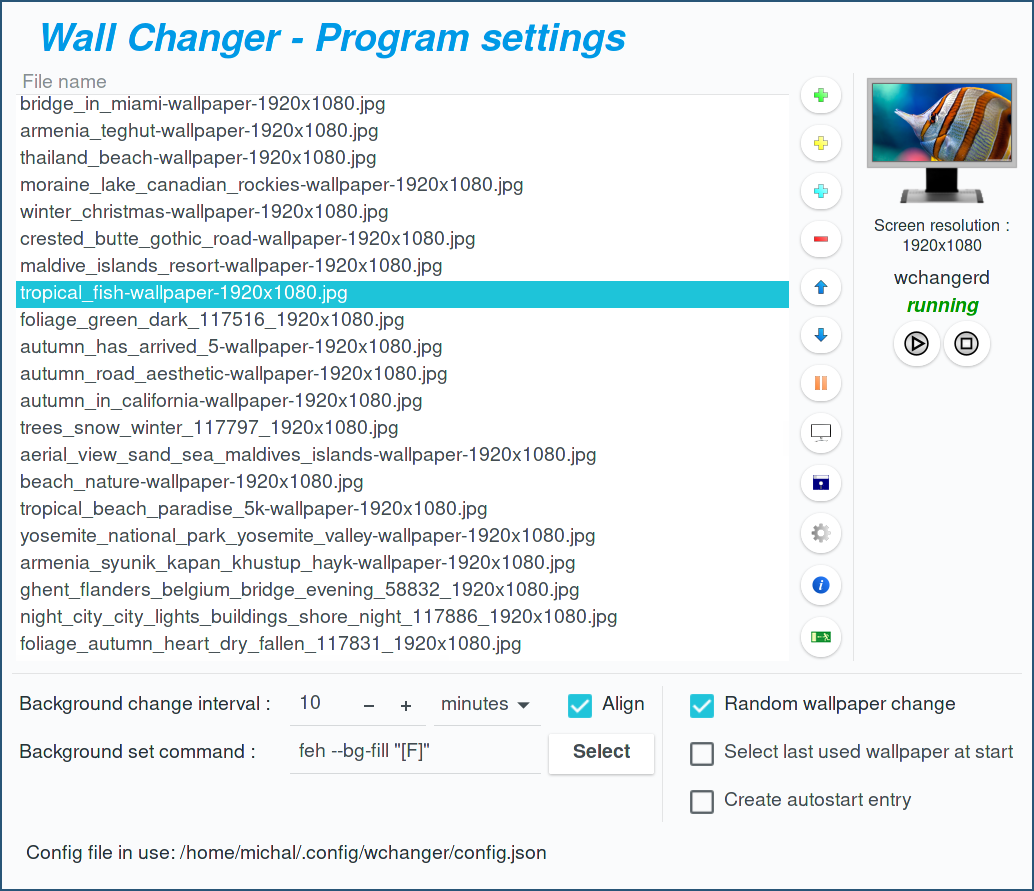
Wall Changer is an automatic wallpaper changer for GNU/Linux.
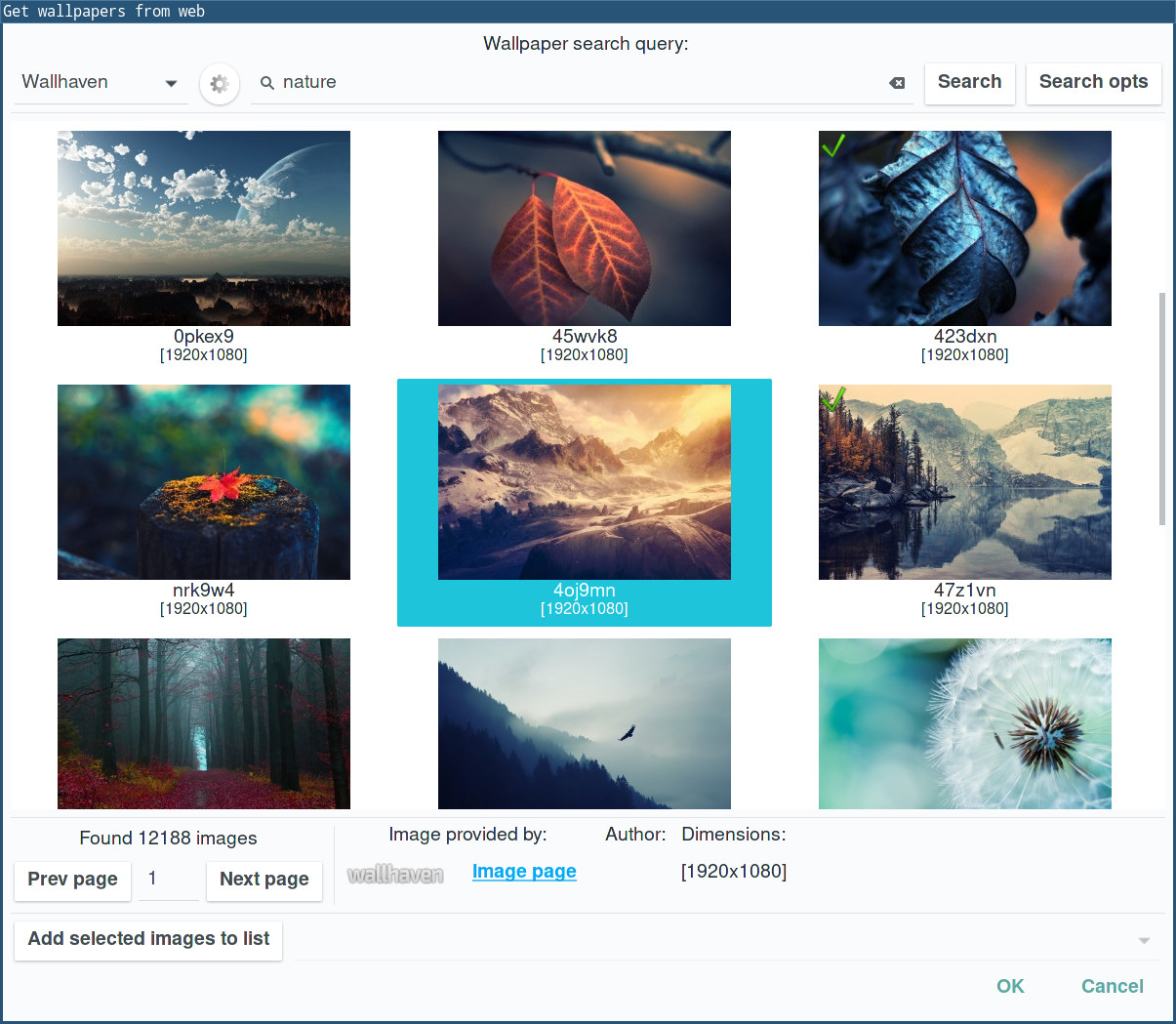
You can select the images that will be used as wallpapers, download
wallpapers from the web, set the commands used to change the wallpaper
and set the intervals between wallpaper changes.
The program works on GNU/Linux and FreeBSD.
Version: 1.7.0 (last update: 01.09.2026)
Supported wallpaper search pages:
- Pixabay
- wallhaven.cc
- Wallpaper Abyss
- Flickr
Screenshots
------------
Requirements
-------------
- GNU/Linux, FreeBSD
- A C23-capable compiler: GCC (>= 13) or Clang (>= 16)
- CMake (>= 3.21)
- GTK+ 3 (>= 3.22)
- json-c (>= 0.12.1)
- libcurl (>= 7.68.0)
Installation
-------------
Wall Changer can be installed from the program package or from the repository.
The program package can be downloaded directly:
wallchanger-1.7.0.tar.gz
or from the download section of the program workspace:
https://savannah.nongnu.org/projects/wallchanger/
Browse the repo:
https://github.com/mi-bb/wallchanger
Arch Linux package in the AUR:
https://aur.archlinux.org/packages/wallchanger/
Downloading the source code from GitHub:
git clone https://github.com/mi-bb/wallchanger.git
Building with CMake
--------------------
The program is built with CMake (>= 3.21). Use an out-of-source build directory (for example ./build) so that the generated files are kept separate from the source code.
To configure, build and install the program, go to the source code directory and type:
cmake -S . -B build
cmake --build build
sudo cmake --install build
The build type defaults to RelWithDebInfo. To choose a different build type or a custom installation prefix:
cmake -S . -B build -DCMAKE_BUILD_TYPE=Release -DCMAKE_INSTALL_PREFIX=/usr
The compiler and the compilation flags can be selected as well:
cmake -S . -B build -DCMAKE_C_COMPILER=gcc -DCMAKE_C_FLAGS="-march=native -O2 -pipe"
with Clang:
cmake -S . -B build -DCMAKE_C_COMPILER=clang -DCMAKE_C_FLAGS="-march=native -O2 -pipe"
-DCMAKE_BUILD_TYPE=Release   builds without the debugging information needed
                             by gdb, which also enlarges the output file,
-DCMAKE_INSTALL_PREFIX=/usr  installs the program in the /usr directory
                             instead of /usr/local,
-DCMAKE_C_COMPILER=gcc       sets the C compiler to gcc,
-DCMAKE_C_COMPILER=clang     sets the C compiler to clang,
-march=native                enables all instruction subsets supported by the
                             local machine,
-O2                          sets the code optimization to level 2,
-pipe                        uses pipes rather than temporary files for
                             communication between the various stages of
                             compilation,
Running
--------
If the compilation completes without problems, two executable files will be created:
wchangercfg
wchangerd
wchangerd works in the background and changes the wallpaper at specific intervals.
Working with the wchangerd daemon:
wchangerd --start      Starts the wchangerd daemon
wchangerd --stop       Stops the wchangerd daemon
wchangerd --restart    Restarts the wchangerd daemon
wchangerd --status     Prints the wchangerd status

wchangerd --once       Changes the wallpaper once and exits

wchangerd --config     Loads the configuration from the given file
wchangercfg is a configuration window for adding images to and removing them from the lists, downloading images from the web, changing the intervals between wallpaper changes, etc.
The wallpaper change command is selected based on the window manager that is currently in use. The application has default wallpaper change commands for several window managers. The default commands can be changed through wchangercfg, using the Select button. It opens the wallpaper command dialog with a list of window managers and their commands. After checking and setting the commands, especially for Xfce, which has an unusual wallpaper set command, you can use this application with different window managers without changing the settings.
After changing the settings using wchangercfg, the wchangerd daemon will load them before the next wallpaper change. If you want to load the settings before that time, you need to restart the wchangerd daemon using the wchangerd --restart command.
Default locations of the configuration file:
(the application looks for it in the order shown below)
~/.config/wchanger/config.json
~/.config/wchanger.json
~/.config/wchanger/wchanger.json
To use a non-standard configuration file path, use the --config option:
wchangerd --config [FILENAME]
wchangercfg --config [FILENAME]
Contact and help
-----------------
In case of problems with the program, please contact me: michal.babik@pm.me
To check out my other apps visit: https://init6.pomorze.pl/