Next: Use cases, Previous: Relational schema, Up: Top [Contents][Index]
The information system is divided into 4 activities:
| • Tools: | TOOLS | |
| • Scripts: | SCRIPTS | |
| • Client: | CLIENT | |
| • Server: | SERVER |
Flood diagram:
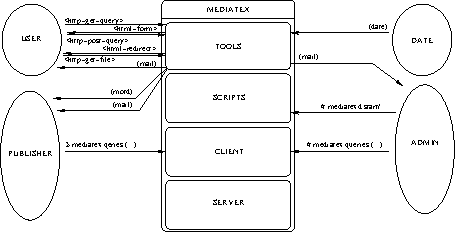
# /etc/init.d/mediatexd start# /etc/init.d/mediatexd stop# /etc/init.d/mediatexd status# /etc/init.d/mediatexd reloadfrom ADMIN (see Who) to init.d (see init.d): start/stop the MEDIATEX daemon.
# mediatex adm init# mediatex adm remove# mediatex adm purge# mediatex adm add user user# mediatex adm del user userfrom ADMIN to misc (see misc): configure the MEDIATEX system.
# mediatex adm add coll [serv-]coll[@host[:port]]# mediatex adm del coll collfrom ADMIN to conf (see conf): configure collections.
(date)$ mediatex add key file to coll coll$ mediatex del key fingerprint from coll coll$ mediatex upgrade[+] [coll coll]from PUBLISHER (see Who) to serv (see serv): manage collection settings.
$ mediatex ls [master] coll$ mediatex add supp supp to (all|coll coll)$ mediatex del supp supp from (all|coll coll)from PUBLISHER to conf (see conf): list collections ; share/withdraw local supports to collections.
$ mediatex ls supp$ mediatex add supp supp on path$ mediatex add file path$ mediatex del supp supp$ mediatex note supp supp as text$ mediatex check supp supp on filefrom PUBLISHER to supp (see supp): manage local supports.
$ mediatex upload[+] [file file [as target]]* [catalog file] [rules file] to coll collfrom PUBLISHER to uploadClient (see uploadClient): upload an incoming archive into the cache.
$ mediatex make [coll coll]$ mediatex clean [coll coll]$ mediatex su [coll coll]$ mediatex audit for mail coll collfrom PUBLISHER to misc (see misc): build/clean the HTML catalogue ; change to server or collection system user ; simulate retrieving all archives.
<http-get-query><http-post-query><http-get-file>from USER (see Who) to Apache (see Apache): USER’s queries generated by its internet browser.
see What
(motd)from Cron (see Cron) to PUBLISHER: message of the day the PUBLISHER see at log-in.
<html-form>(if archive is not available) ...
<html-redirect>(if archive is available)
from Apache (see Apache) to USER: replies to the USER’s internet browser.
(mail to USER)from Sendmail (see Exim) to USER: archive availability notification.
(mail to PUBLISHER)from Sendmail (see Exim) to PUBLISHER: audit availability notification.
(mail to ADMIN)from Sendmail (see Exim) to ADMIN: scheduled task error notification.
Next: Use cases, Previous: Relational schema, Up: Top [Contents][Index]