WP-MIRROR

Abstract
WP-MIRROR is a free utility for building mirrors of any desired set of Wikimedia Foundation wikis.
Which Wikis
The Wikimedia Foundation offers wikipedias in nearly 300 languages. In addition, the WMF has several other projects (e.g. wikibooks, wiktionary, etc.) for a total of around 1000 wikis.
WP-MIRROR can build mirrors of any desired set of these wikis.
Why Build a Mirror
The main use cases for a mirror are these:- Development. If you are technically minded and need a mirror with which you may conduct experiments;
- Infrastructure. If you need redundancy, or need to serve pages locally to minimize telecommunications traffic;
- Offline browsing. If you need off-line access, perhaps for reasons of mobility, availability, and privacy; and
- Research. If you need a mirror as a tool to assist your research on the contents of any given wiki.
Key Features
WP-MIRROR builds a set of mirrors:
- Appearance. A wiki page rendered by a mirror looks very similar to the same page rendered by the WMF servers;
- Behavior. A wiki page rendered by a mirror behaves almost the same (e.g. edit, search, user account creation, beta features); and
- Completeness. Builds a complete mirror with original size images.
WP-MIRROR is easy:
- Easy to install. Available as a DEB package, and is available from a Debian package repository;
- Easy to configure. The user may select any desired set of wikis by editing just one line in a configuration file;
- Easy to use. Sets up virtual hosts such as http://simple.wikipedia.site/, http://simple.wiktionary.site/, and http://www.wikidata.site/, one for each wiki in the set, which the user may access with a web browser; and
- Robust. Stable even in the face of: corrupt dump files, corrupt media files, incomplete downloads, Internet access interruptions, and low disk space; and uses check-pointing to resume after process interruption.
WP-MIRROR automatically configures other software:
- Apache2. Enables the URL rewrite module, and enables virtual hosts;
- Cron. Sets up a cron job that updates the mirrors weekly;
- MediaWiki. Configures MediaWiki 1.24 and several dozen extensions; and
- MySQL. Configures MySQL to achieve an order-of-magnitude improvement in database performance.
WP-MIRROR is free:
- Free software. Software is released under the GNU General Public License (GPLv3); and
- Free documentation. Documentation is released under the GNU Free Documentation License, Version 1.3.
Out-of-the-box Experience
WP-MIRROR, by default, builds the following set of mirrors:
where Simple English means shorter sentences, and Wikidata is a centralized collection of facts usable by all other wikis (e.g. to populate infoboxes).
The default works out-of-the-box with no user configuration. It should build in 200ks (two days), occupy 150G of disk space, be served locally by virtual hosts: http://simple.wikipedia.site/, http://simple.wiktionary.site/, and http://www.wikidata.site/, and update automatically every week.
The default should be suitable for anyone who learned English as a second language (ESL).
Top Ten Wikipedias
The top ten wikipedias are the: en, de, nl, fr, it, es, ru, sv, pl, and ja wikipedias. Because WP-MIRROR uses original size media files, the top ten are too large to fit on a laptop with a single 500G disk, unless the user does not need the images (and this is configurable). The en wikipedia is the most demanding case. It should build in 1Ms (twelve days), occupy 3T of disk space, be served locally by a virtual host http://en.wikipedia.site/, and update automatically every month.
Most features are configurable, either through command-line options, or via a configuration file (/etc/wp-mirror/local.conf).
Process
WP-MIRROR is non-interactive and normally runs in background as a weekly cron job, updating the mirror whenever the Wikimedia Foundation posts new dump files.
WP-MIRROR maintains the state of the mirror in a transactional database (InnoDB which is the ACID compliant storage engine for MySQL). There are three advantages to this:
- Checkpointing. The state information is Durable (the `D' in ACID). When WP-MIRROR is interrupted (e.g. user closes laptop, power fails, cat walks across keyboard) the state information serves as a checkpoint. When WP-MIRROR is next started, it picks up where it left off.
- Concurrency. Multiple instances of WP-MIRROR can run concurrently. That is to say, each instance of WP-MIRROR is Isolated (the `I' in ACID) from every other instance. The concurrency feature is intended for desktop use when one is mirroring any of the top ten wikipedias.
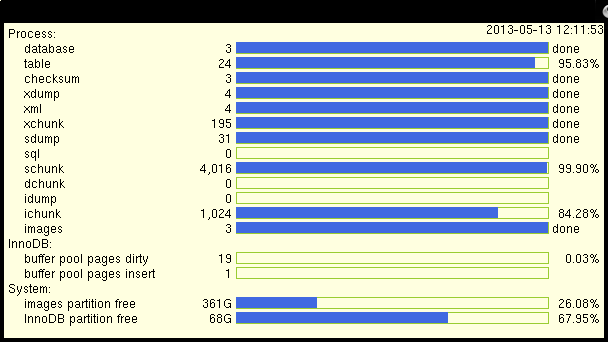
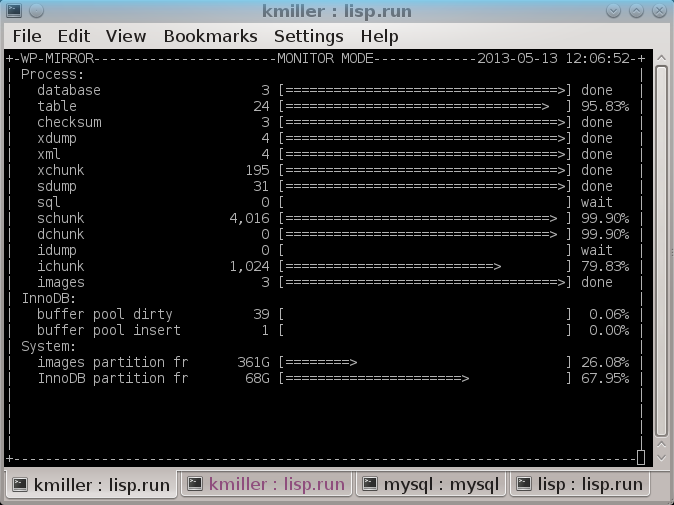
- Monitoring. WP-MIRROR can also be run in monitor mode (concurrently with instances that are building mirrors). Instances running in monitor mode display the state of each wikipedia. If a suitable windowing system is present, progress bars are rendered using graphics in a separate window, and otherwise using ASCII characters in a console (see figures below).
WP-MIRROR is designed for robustness. WP-MIRROR asserts hardware and software prerequisites, skips over unparsable pages and bad file names, waits for internet access when needed, and exits gracefully if disk space runs low.
Downloading WP-MIRROR
WP-MIRROR can be found on the main GNU server: http://download.savannah.gnu.org/releases/wp-mirror/ (via HTTP).
Documentation
Documentation for WP-MIRROR is available online. The WP-MIRROR Reference Manual is available in PDF format. If you install from a package, the documentation will be registered automatically with `doc-base' and readily found using `dhelp' or `dwww'.
You may also find more information about WP-MIRROR by running info wp-mirror or man wp-mirror, or by looking at /usr/share/doc/wp-mirror/, /usr/local/doc/wp-mirror/, or similar directories on your system. A brief summary is available by running wp-mirror --help.
Dependencies
WP-MIRROR has numerous dependences including: apache2, Image Magick, MediaWiki, and MySQL. For this reason, it is easiest for the user to install WP-MIRROR from a package.
WP-MIRROR 0.7 is available as a DEB package. It works `out-of-the-box' on Debian GNU/Linux 7.4 (wheezy) with backports and Ubuntu 14.04 LTS (trusty). Porting to other distributions may be considered for a future release.
WP-MIRROR 0.6 is available as a DEB package. It works `out-of-the-box' on Debian GNU/Linux 7.0 (wheezy) and Ubuntu 12.10 (quantal).
WP-MIRROR 0.5 is available as a DEB package. It works `out-of-the-box' on Debian GNU/Linux 7.0 (wheezy) and Ubuntu 12.10 (quantal).
WP-MIRROR 0.4 is available as a DEB package. It works `out-of-the-box' on Debian GNU/Linux 7.0 (wheezy).
WP-MIRROR 0.3 and earlier versions, were developed on a PC with the Debian GNU/Linux 6.0 (squeeze) distribution installed. User configuration of dependencies is required.
There are no plans to backport WP-MIRROR to earlier distributions.
Installation
Debian GNU/Linux 7.4 (wheezy)
Method 1: Install from Debian package repository
1.1) Import the author's GPG public key into your root-shell's GPG keyring, and into your APT trusted keyring:
root-shell# aptitude install gnupg-curl
root-shell# gpg --keyserver zimmermann.mayfirst.org --recv-key 0x320AFC9D382FBD0C
root-shell# gpg --armor --export 0x320AFC9D382FBD0C | apt-key add -
1.2) Edit /etc/apt/sources.list by appending the `wheezy-backports' and the `debian-wpmirror' package repositories, like so:
deb http://ftp.us.debian.org/debian/ wheezy           main
deb http://security.debian.org/      wheezy/updates   main
deb http://ftp.us.debian.org/debian/ wheezy-updates   main
deb http://ftp.us.debian.org/debian/ wheezy-backports main
deb http://download.savannah.gnu.org/releases/wp-mirror/debian-wpmirror/ wheezy main
If you are building your mirror on an IPv6 only network, then the last line of /etc/apt/sources.list should instead read:
deb http://savannah.c3sl.ufpr.br/wp-mirror/debian-wpmirror/ wheezy main
1.3) Upgrade your Debian distribution:
root-shell# aptitude update
root-shell# aptitude safe-upgrade
1.4) Install WP-MIRROR and its dependencies:
root-shell# aptitude install wp-mirror
1.5) Run:
root-shell# wp-mirror --mirror
WP-MIRROR `just works'. Configuration is entirely automated; and that includes configuration of dependencies such as `apache2', `MediaWiki', and `MySQL'.
Method 2: Download and install DEB packages
2.1) Releases are found at http://download.savannah.gnu.org/releases/wp-mirror/. Select the most recent DEB packages, and install them in the following order:
root-shell# dpkg --install mediawiki-mwxml2sql_0.0.2.24-1_amd64.deb
root-shell# dpkg --install wp-mirror-mediawiki_1.24.22-1_all.deb
root-shell# dpkg --install wp-mirror-mediawiki-extensions-math-texvc_1.24.22-1_amd64.deb
root-shell# dpkg --install wp-mirror-mediawiki-extensions_1.24.22-1_all.deb
root-shell# dpkg --install wp-mirror_0.7.4-1_all.deb
2.2) Run:
root-shell# wp-mirror --mirror
Ubuntu 14.04 LTS (trusty)
Method 1: Install from Debian package repository
1.1) Import the author's GPG public key into your root-shell's GPG keyring, and into your APT trusted keyring:
root-shell# apt-get install aptitude
root-shell# aptitude install gnupg-curl
root-shell# gpg --keyserver zimmermann.mayfirst.org --recv-key 0x320AFC9D382FBD0C
root-shell# gpg --armor --export 0x320AFC9D382FBD0C | apt-key add -
1.2) Edit /etc/apt/sources.list by appending the `debian-wpmirror' package repositories, like so:
deb http://download.savannah.gnu.org/releases/wp-mirror/debian-wpmirror/ wheezy main
If you are building your mirror on an IPv6 only network, then the last line of /etc/apt/sources.list should instead read:
deb http://savannah.c3sl.ufpr.br/wp-mirror/debian-wpmirror/ wheezy main
1.3) Upgrade your Debian distribution:
root-shell# aptitude update
root-shell# aptitude safe-upgrade
1.4) Install WP-MIRROR and its dependencies:
root-shell# aptitude install wp-mirror
1.5) Run:
root-shell# wp-mirror --mirror
WP-MIRROR `just works'. Configuration is entirely automated; and that includes configuration of dependencies such as `apache2', `MediaWiki', and `MySQL'.
Debian GNU/Linux 6.0 (squeeze)
Mailing lists
WP-MIRROR has the following mailing lists:
- wp-mirror-announce is used to announce releases
- wp-mirror-devel is a closed list for developers and testers.
- wp-mirror-list is used to discuss most aspects of WP-MIRROR (e.g. feature requests and bug reports).
Getting involved
Development of WP-MIRROR, and GNU in general, is a volunteer effort, and you can contribute. For information, please read How to help GNU. If you'd like to get involved, it's a good idea to join the discussion mailing list (see above).
- Test releases
- Trying the latest test release (when available) is always appreciated. Test releases of WP-MIRROR can be found at http://download.savannah.gnu.org/releases/wp-mirror/ (via HTTP).
- Development
- For development sources, issue trackers, and other information, please see the WP-MIRROR project page at savannah.gnu.org.
- Translating WP-MIRROR
- To translate WP-MIRROR's messages into other languages, please see the Translation Project page for WP-MIRROR. If you have a new translation of the message strings, or updates to the existing strings, please have the changes made in this repository. Only translations from this site will be incorporated into WP-MIRROR. For more information, see the Translation Project.
- Maintainer
- WP-MIRROR is currently being maintained by Dr. Kent L. Miller. Please use the mailing lists for contact.
Licensing
WP-MIRROR is free software; you can redistribute it and/or modify it under the terms of the GNU General Public License as published by the Free Software Foundation; either version 3 of the License, or (at your option) any later version.